
 Home
Home Download
 News
News Mastodon
 Bluesky
 X
X Summary - 18 Years
 Summary - 17 Years
 Summary - 16 Years
 Summary - 15 Years
 Summary - 13 Years
 Summary - 11 Years
 Summary - 10 Years
 Resources
 Technical Reference
 Scripting Tutorial
 Video Tutorials
 Wiki Pages
 Image Gallery
 Color Presets
 Using libgmic
 G'MIC Online
 Community
 Discussion Forum (Pixls.us)
 GimpChat
 IRC
IRC Report Issue
| Table of Contents ▸ List of Commands ▸ Reptorian's Commands ▸ rep_spiral_distort | ◀ rep_rectangular_polar_transformation | rep_fibonacci_fill ▶ |
rep_spiral_distort
Arguments:
- _revolution!=0,_height!=0,_refraction>0,_direction={ 0=clockwise | 1=counterclockwise },_angle,_continuous_spiral={ 0=periodic | 1=continuous },-1<=_preshift_x<=1,-1<=_preshift_y<=1,_preshift_boundary={ 0=periodic | 1=mirror },_skew_x,_skew_y,_skew_m,_scale_coord_x,_scale_coord_y,_offx,_offy,_spiral_boundary={ 0=none | 1=neumann | 2=periodic | 3=mirror },_interpolation={ 0=nearest | 1=average | 2=linear | 3=bicubic | 4=lanczos }
Description:
Transform images into spiral by using spiral gradient for x coordinate, and radial gradient for y coordinate.(equivalent to shortcut command rep_sd).
_revolution defines the number of revolution within the spiral assuming coordinates range of [-1,1].
_height is the height of spiral. The higher the height of the spiral, the more duplicates will repeat within one revolution.
_refraction refers to the logarithmic distortion within spiral.
_direction determines if it clockwise or counter-clockwise.
_angle determines the function angle.
_continuous_spiral determines whether the spiral distortion is continuous or not.
_preshift_x shifts the images before the spiral distortion along the x-axis.
_preshift_y shifts the image before the spiral distortion along the y-axis.
_preshift_boundary determines the boundary within the preliminary shift.
_skew_x skews the distortion alongside the x-axis. It is recommended to keep ranges to -100% to 100%.
_skew_y skews the distortion alongside the y-axis. It is recommended to keep ranges to -100% to 100%.
_skew_m is the multiplier for skewing.
_scale_x scales the coordinates alongside the x-axis.
_scale_y scales the coordinates alongside the y-axis.
_offx determines the offset-placement of the distortion alongside the x-axis. It is recommended to keep ranges to -100% to 100%.
_offy determines the offset-placement of the distortion alongside the y-axis. It is recommended to keep ranges to -100% to 100%.
_spiral_boundary determines how the out-of-bound values is to be evaluated.
_interpolation determines the interpolation of the spiral distortion.
Default values:
_frequency=1,_height=1,_refraction=0,_direction=0,_angle=0,_continuous_spiral=0,_preshift_x=0,_preshift_y=0,_preshift_boundary=0,_skew_x=0,_skew_y=0,_skew_m=1,_scale_x=1,_scale_y=1,_offx=0,_offy=0,_spiral_boundary=3,'_interpolation=4'
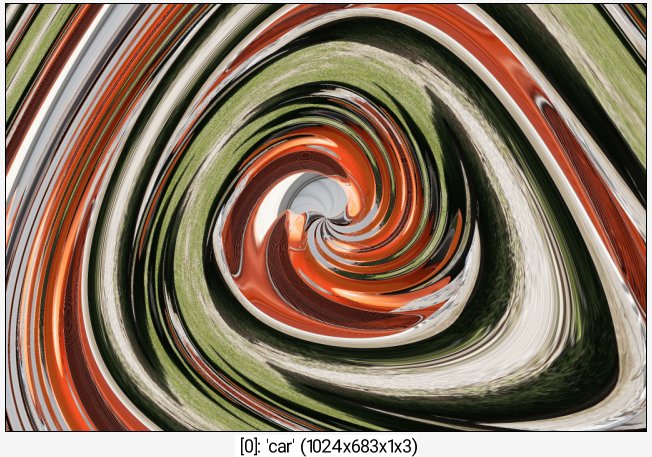
Example of use:
sp car rep_spiral_distort 1,2,2,1,30,1,50%,50%,1,1,.25